
Key takeaways
Most grading time disappears before you open the first essay: vague rubrics, essay-by-essay scoring, and comments written from scratch every time.
Criterion-by-criterion grading and a saved comment bank cut 25-40% off scoring time before AI ever enters the workflow.
A rubric-trained TA only saves time once it is calibrated to your rubric, not a generic writing standard.
Calibrating on your first five submissions is the step most teachers skip, and the one that decides whether the AI's first pass sounds like you or needs a full rewrite.
The job shifts from writing feedback to reviewing it. That is the real time saving.
Introduction
Grading essays is not slow because teachers are slow. The workflow itself was not built for speed. Reading each essay, scoring every criterion, and writing feedback from scratch compounds across a stack of 35 student essays.
The fastest path fixes the workflow first, then adds AI to the part of it that is actually slow. Most advice skips straight to a chatbot before the rubric is even ready, which just moves a slow grading system online instead of fixing it. This guide covers both, the technique changes that save time before any tool touches your stack, and how to set up an ai essay grader so its first pass is usable instead of something you rewrite line by line.
Why essay grading takes so long
Three bottlenecks account for most of the lost time: rubric ambiguity, sequential grading, and comment writing. Rubric ambiguity is the slowest of the three, since a criterion like "strong argument" turns every score into a fresh judgment call.
Sequential grading, reading and scoring one full essay before opening the next, loads and unloads the rubric from working memory 35 times, and that repetition is where scoring drift creeps in. Comment writing is the most visible bottleneck, but most feedback repeats the same 8 to 12 patterns, which is exactly what a comment bank replaces. See grading tips for teachers for more quick wins in the same spirit.
Six steps to grade essays faster
Step 1: Turn your rubric into a scoring key
A rubric that describes quality in general terms creates a judgment call at every criterion, on every essay. A rubric with one sentence per score level replaces that judgment call with a match. "A 4 in evidence use means at least two pieces of evidence explained in the student's own words, with an explicit connection to the thesis," is a scoring key.
This step also decides whether an AI grading assistant is useful later. A generic rubric produces a generic AI first pass, since the AI calibrates to whatever specificity it is given. Read how expert teachers build rubrics for a full walkthrough of what that specificity looks like, criterion by criterion.
Step 2: Grade criterion by criterion across the stack
Vertical grading is the fastest technique-only change available without AI. Instead of scoring every criterion on essay 1 before opening essay 2, score one criterion across all 35 essays, then move to the next. The rubric stays loaded in working memory, so your standard stays consistent from the first essay to the last.
Step 3: Build a reusable comment bank
A comment bank is 10 to 15 saved responses for the patterns that show up in nearly every stack: weak thesis, unsupported evidence, unclear topic sentence. Building it takes one grading session, and every session after that, common feedback drops from about 90 seconds per comment to 15.
Step 4: Give the AI real assignment context
The most common mistake in AI essay grading is running it without saying what the assignment was. Without a grade level, essay type, and focus areas, an AI grading assistant applies a generic academic standard, which grades a grade 5 personal narrative the same way it grades a grade 12 argumentative essay.
This step takes about 30 seconds per assignment type, and it works the same whether the submission is a Google Doc, a Word file, or a PDF pulled from Google Drive. The more specific the context, the more calibrated the first pass that comes back.
Step 5: Calibrate on your first five submissions
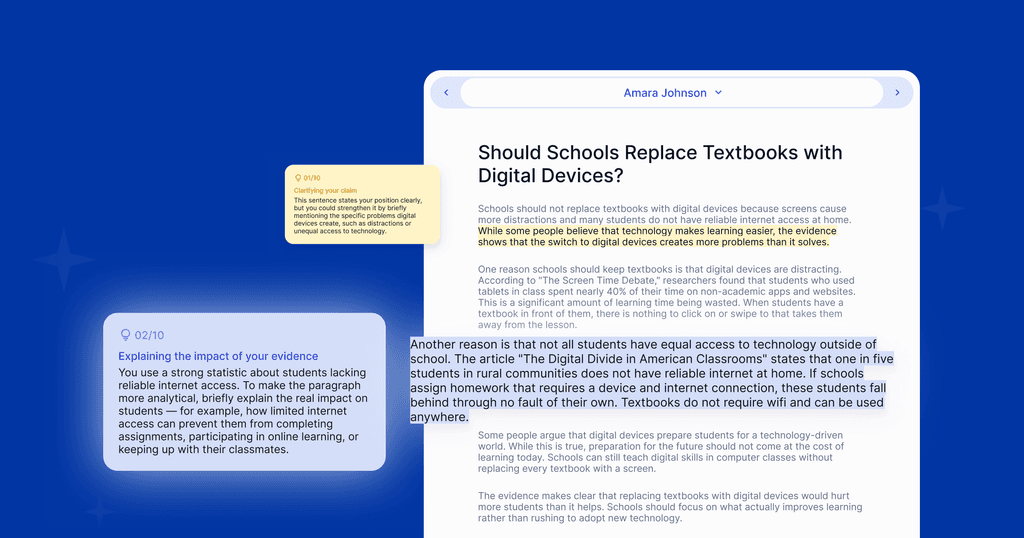
Calibration is the step most teachers skip, and the one that separates a rubric-trained TA from a generic feedback generator. For the first five submissions in a new assignment, grade alongside the AI: review its score per criterion, override where it diverges from your judgment, and let it learn how you apply the rubric. See training your ai teaching assistant for how a calibration session works in practice.
After calibration, review the first pass criterion by criterion instead of treating it as a final grade. Note any pattern that repeats across submissions, since that usually signals a calibration adjustment, not a one-off correction. As confidence builds, shift from reviewing every submission to spot-checking.
Step 6: Return feedback that sounds like you
Before returning any comment, add one specific detail: a reference to a passage, or an acknowledgment of a choice the student made. That detail is what keeps AI-assisted feedback sounding like the teacher wrote it, and it takes about 15 seconds per essay. Read how feedback translates during ai grading for how this sounds across different feedback styles.
Feedback returned the next day helps a student more than comprehensive feedback returned two weeks later. After the return, note what you would adjust in the rubric or comment bank before the next stack, so the workflow gets a little faster with every round.
When AI for essay grading works well, and when it doesn't
AI grading performs best on analytical and argumentative essays with clear rubric criteria, and on research papers where citation standards are already defined, especially at grades 6-12, where writing patterns are consistent enough to score reliably. It is most useful for class sets of 20 or more, where the calibration investment pays off fast.
It performs least well on creative writing with intentional unconventional choices, and on short, early pieces where the student's voice is itself a rubric criterion. For those, manual grading with a comment bank is often still faster. See consistent feedback in early grades for how grade level changes what AI grading can and cannot do well.
How much faster does grading essays with AI actually get
AI grading does not make reading faster, since reading was never the bottleneck. It makes scoring faster once the rubric is precise enough to apply consistently, and it replaces comment composition with comment review. Read what makes ai grading accurate for what that consistency actually depends on.
FAQs: How to Grade Essays Faster
The saving depends on which step in the workflow you are measuring. For teachers whose main bottleneck is comment writing, a rubric-calibrated AI grading assistant typically reduces per-essay time by 30-50% on a class set once calibration is complete. Reading time does not change. Scoring time decreases when most scores require a confirm rather than a correction. Read what makes ai grading accurate for the benchmarked data.
Criterion-by-criterion grading means scoring one rubric row across the entire class set before moving to the next row, rather than scoring all criteria on essay 1 before opening essay 2. It keeps your rubric loaded in working memory, reduces calibration time per decision, and keeps your standard consistent across the full stack. No tools required. Most teachers who try it do not go back to essay-by-essay grading.
You can, but results improve when your rubric has defined score point descriptions rather than vague quality labels. EnlightenAI calibrates to the rubric you already use, learning from your first five graded submissions rather than from the rubric text alone. If your rubric is vague, the AI learns from your grading patterns. Read how feedback translates during ai grading for how the handoff works.
It depends on what you do with the time saved. Feedback returned the next day is more useful to a student than comprehensive feedback returned two weeks later, because students act on feedback closest to the writing moment. The concern about quality usually comes from comparing a rushed process to a careful slow one, but the relevant comparison is a fast calibrated workflow vs. a slow one that arrives after the next assignment is already due.