
Key takeaways
A rubric that isn't tested against real student work usually collapses under actual grading. Performance levels that sound distinct in theory often produce the same score in practice.
Pick your rubric type, holistic, analytic, or single-point, based on what you'll do with the result, not by default.
Specific descriptors beat adjectives every time. "Uses credible, peer-reviewed sources" holds up under grading pressure, "good sources" doesn't.
Piloting the rubric on a few real samples before full use is what catches inconsistency early, especially with more than one grader involved.
Best for: teachers building a rubric they'll actually apply the same way from the first submission to the last, not just a document that looks complete.
Introduction
A rubric that isn't used consistently isn't really a rubric, it's a document you wrote once and stopped checking against. The six steps below build one you'll actually apply the same way on submission one and submission forty, not just a grid that looked complete when you finished it.
This works for a single assignment or a rubric you'll reuse all year. For building it directly into a grading workflow instead of a standalone document, see pretraining your AI teaching assistant once you have a draft.
Why most rubrics fail before they are even used
A rubric written in one sitting, without testing it against real student work, almost always has the same problem: the performance levels sound different from each other in theory but collapse into the same judgment call in practice. "Good" and "excellent" read as distinct until you're staring at two actual essays that both feel like a 3.
The fix isn't writing more detailed adjectives, it's testing the rubric against real work before you rely on it for a whole class set. A rubric that two different graders apply the same way on the same paper is doing its job, one that produces different scores from different people isn't ready yet, no matter how thorough it looks on paper.
6 steps to build a rubric that actually works
1. Clarify what you are actually assessing
Before you write a single criterion, name the specific learning objectives this assignment is supposed to show, not the general subject area. "Persuasive writing" is a subject, "takes a defensible position and supports it with two pieces of evidence" is a learning objective you can actually grade against.
Decide here whether this is a formative assessment, checking progress mid-unit, or a summative one, since that changes how much weight the rubric should carry and how much room it should leave for revision after feedback.
2. Choose your rubric type
A holistic rubric gives one overall score based on the work as a whole, fast to apply but light on specific feedback. An analytic rubric scores each criterion separately, slower to apply but far more useful for telling a student exactly what to fix. A single-point rubric describes only the target performance level and leaves space for notes above and below it, which is often the fastest to write and the easiest for students to actually read.
Pick based on what you'll do with the result, a quick formative check usually doesn't need the full weight of an analytic rubric, and a major research paper usually needs more than a single overall score can carry.
3. Pick a starting point
Don't build from a blank page if you don't have to. Start with an existing template, adapt a rubric from a similar assignment, or let an AI generator draft one for you to edit, all three save real time over starting from nothing, and editing a draft is faster than staring at an empty grid.
Whichever starting point you use, build the actual rubric in a table or a Google Sheets document first, then transfer it into your LMS once it's finished. Editing a grid in a spreadsheet is faster than editing rubric cells one at a time inside Canvas or Google Classroom, and you'll want to revise this draft more than once before it's done.
4. Write criteria and descriptors, not adjectives
Each criterion needs a description specific enough that two different people would apply it the same way. Replace "good sources" with "uses credible, peer-reviewed sources," and replace a bare count like "three spelling errors" with an impact statement like "errors don't distract from readability," since the second version still applies whether the paper has one error or ten.
If more than one criterion matters more than the others, decide the weighting of criteria now, not while you're mid-grading. An unweighted rubric silently tells students that citation formatting matters as much as their argument, which is rarely what you actually mean.
5. Define performance levels clearly
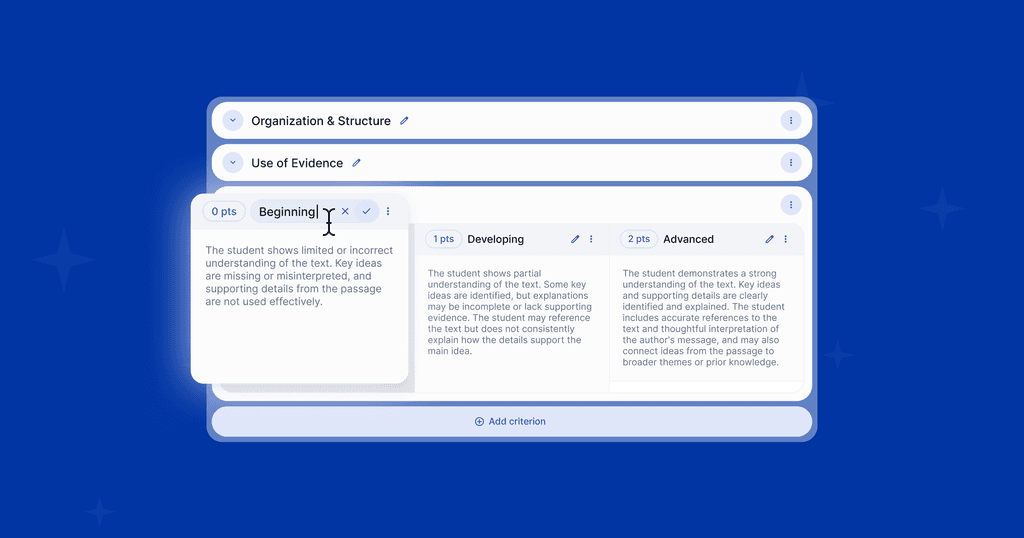
Use parallel structure across every rubric level so a reader can scan left to right and see exactly what changes at each step up. Vague labels like "needs improvement" without a specific descriptor are where most disagreements between graders start, since two people can each be technically right about what "needs improvement" means for a paper they've never discussed.
Keep the whole rubric to one page if you can. A rubric that takes longer to read than the assignment takes to grade won't get used consistently, no matter how precise the language is.
6. Pilot it, then adjust for multiple graders
Apply the finished rubric to two or three real samples of student work before you use it on a full stack, ask a colleague or a TA to score the same samples independently. If your scores land in different places on the same paper, the rubric's language needs to be tighter, not the grader's judgment, that gap is a rubric problem to fix before it becomes a grading-consistency problem across a whole department.
If you're grading inside an LMS with a comment-and-score workflow, like Canvas SpeedGrader or Google Classroom, test the rubric there specifically. A rubric that reads clearly on paper can still be clumsy to actually apply inside your grading tool, and that friction is exactly what causes graders to shortcut it under time pressure.
What a rubric like this actually catches
A rubric built this way earns its keep the moment more than one person grades against it, or the same person grades the same assignment across multiple class periods. The real test isn't whether the rubric looks thorough, it's whether two graders land on the same score for the same paper, and whether your own scores stay consistent from the first submission to the last.
That consistency question doesn't go away once the rubric is finished, it shows up every time you actually use it at volume. See how to check for that kind of drift in AI grading accuracy compared to human grading, and what holding a standard at scale across a full department actually requires.
If keeping a finished rubric applied consistently across a full class set is the part that breaks down by submission thirty, that's the specific gap a rubric-trained grading tool is built to close.
Build your rubric once with EnlightenAI
A rubric is only as useful as its most consistent application. EnlightenAI takes the rubric you just built and applies it identically from the first submission to the last, so the drift that happens by hand at submission thirty-four doesn't happen at all.
Start with the assignments already on your desk. Get started for free.
FAQs: How to Make a Rubric
The three main types are holistic (one overall score), analytic (a separate score per criterion), and single-point (only the target level is described, with room for notes above and below it). Analytic rubrics give the most detailed feedback; single-point rubrics are usually the fastest to write and read. See more on how expert teachers apply these in how expert teachers use rubrics.
Specific enough that two different graders would apply the same criterion to the same paper the same way. Replace vague adjectives like "good" or "excellent" with an observable, specific quality, and describe impact rather than counting minor errors, since an impact statement still holds up regardless of the exact count.
Yes, an AI rubric generator can draft criteria and performance levels from an assignment description, which is usually faster to edit than writing one from scratch. The draft still needs a human pass, AI-generated rubrics tend toward generic language and need adjusting for your specific grade level and assignment.
Pilot the rubric on the same two or three samples with each grader before using it on a full stack, and compare scores directly. Any gap between graders on the same paper is a sign the rubric's language needs to be tighter, not that one grader is wrong. For consistency across a whole department at scale, see grading software for schools.