Key takeaways
Generate AI writing samples on demand — no need to dig through old folders or create exemplars from scratch.
Specify word count, reading level, and target strengths or weaknesses for each sample.
Generate up to five samples, edit them, and save as anchor examples in minutes.
Better anchor examples mean more accurate, consistent AI feedback for students.
Over the past year, we’ve heard a consistent theme from teachers: when their AI-enabled teaching assistants have clear expectations for what student work looks like look like, their AI grading and feedback assistant gets better; feedback becomes more accurate, scores are more consistent, and teachers feel more confident using EnlightenAI.
We have also heard that teachers don’t always have a readily available set of student writing samples to train their AI assistant, and developing these from scratch can be a time-consuming challenge. That’s why we’re excited to share a new update that makes it dramatically easier to create high-quality anchor examples of student work - right inside EnlightenAI.
Before we dive in! If you want a refresher on how anchor examples work (and why they matter), you can learn more here.
Prefer to see it in action? Watch this quick video walkthrough!
Sometimes the best student writing samples are stuck in last year’s folders. Sometimes they’re on paper. Sometimes they don’t exist yet, because the assignment is brand new.
For all those times, we’ve built a way to get you from “I need examples” to “I have five usable anchors” in minutes.
When you click the Upload / Sample Work button during assignment setup, you’ll now see a new option: “Generate with AI”
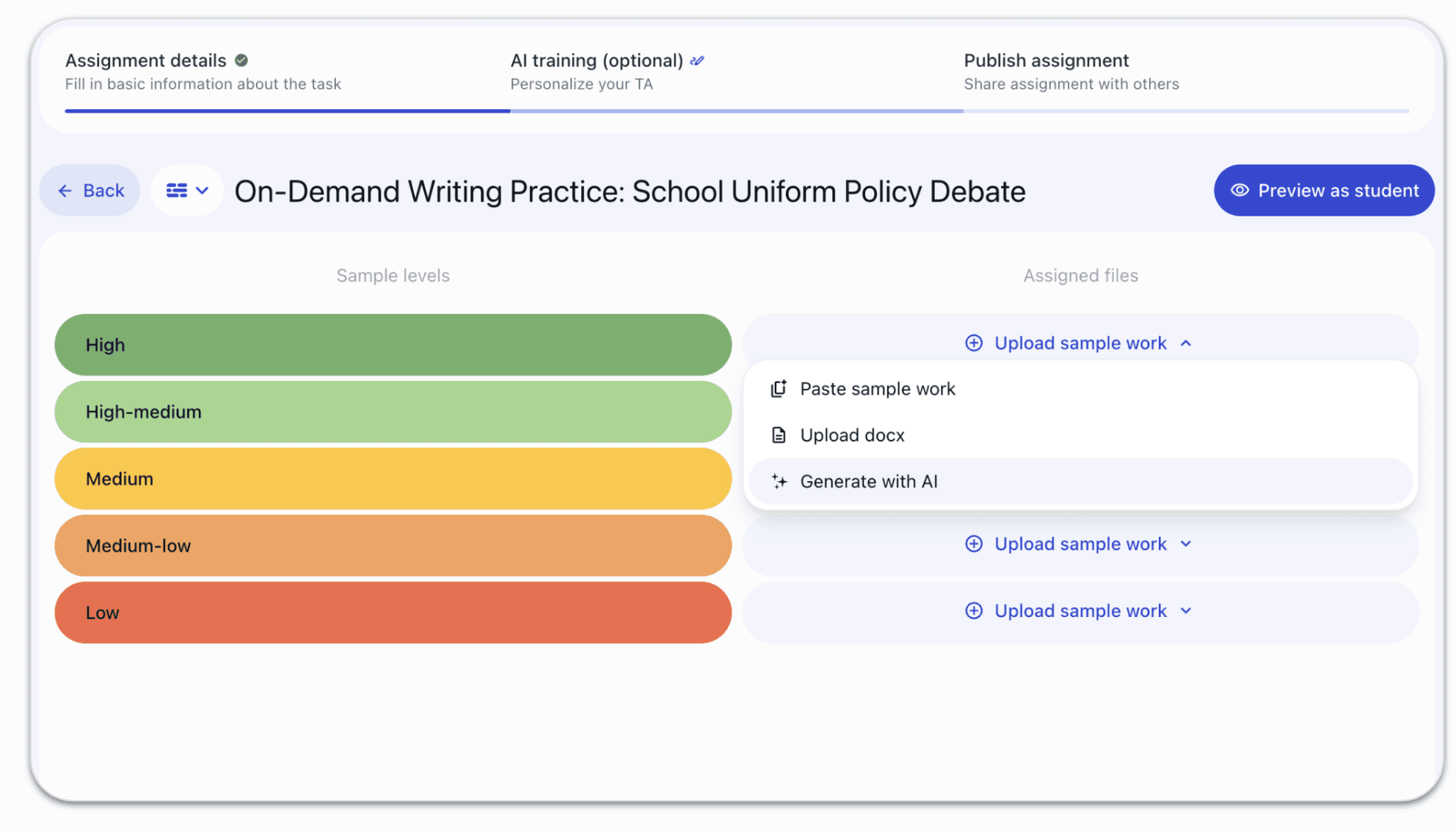
Clicking “Generate with AI” opens a new window that’s designed specifically for teachers who want targeted, rubric-aligned student samples.
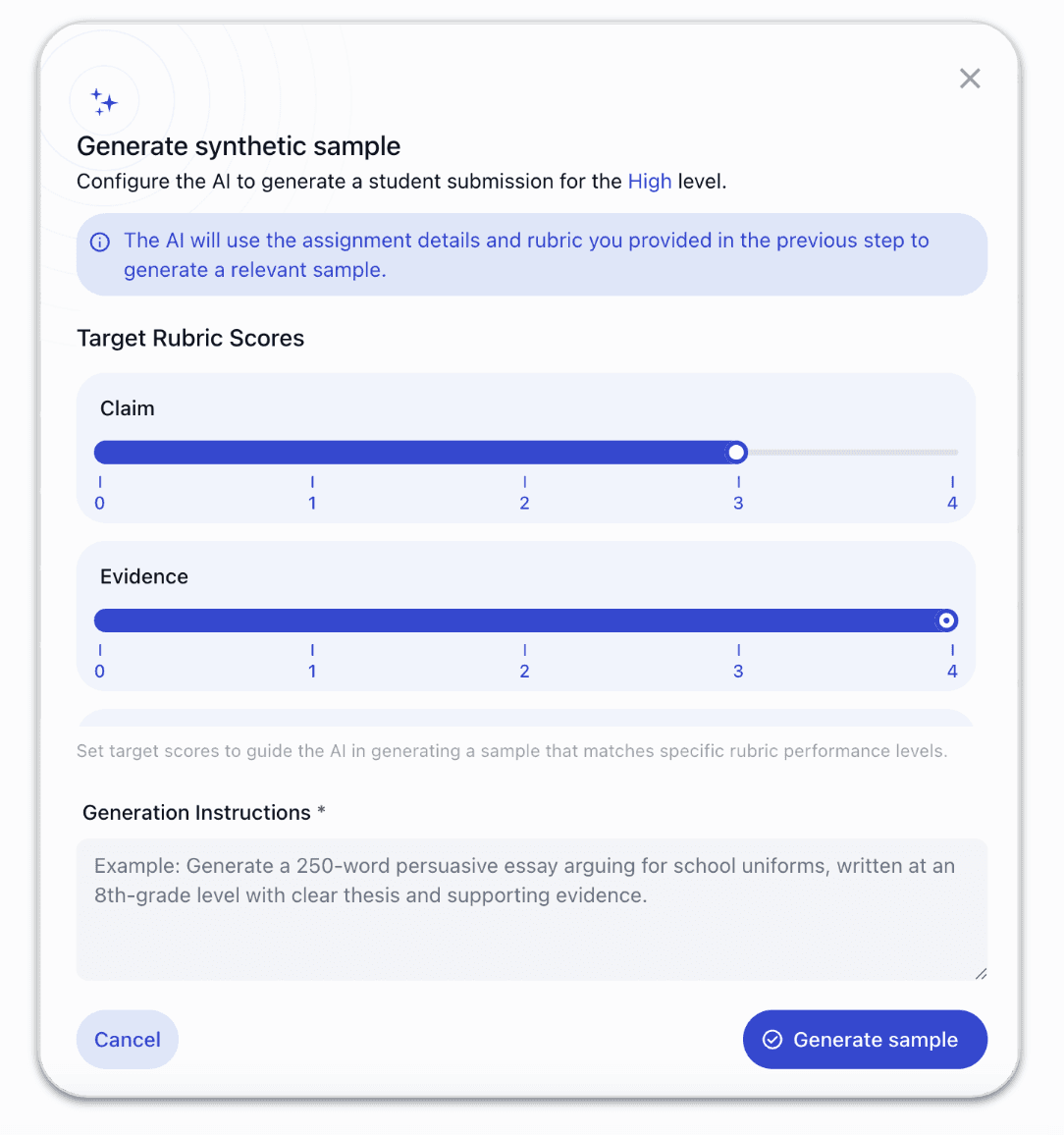
First, you’ll see the rubric you already added to the assignment. You’ll be able to view the rubric categories and the scoring levels you’ve defined, and define the scores you’re looking for in each writing sample. Choose your response level, and then add custom instructions to shape the sample.
This is where you can get very specific. You can include guidance like:
Word count: “Make this student response between 350–450 words”
Reading level / Lexile band: “grade 8 writing” or “advanced high school level”
The type of strengths or areas of growth you want to see: strong introductory sentences, solid use of transition phrases, grammar errors, limited textual evidence, off-topic reasoning, etc
Any other constraints, instructions, or context you want the student writing to follow
In other words: you’re not generating generic “student writing.” You’re generating a first draft that you can edit and adjust to end up with the kind of realistic sample that helps you clearly define what each score point looks like in your class You can focus in on the specific areas of writing that you’re grading for, and let EnlightenAI help with the basics of creating the draft.
You can generate up to five samples, edit them as much as you’d like, and save them as your anchor examples. As always, with EnlightenAI, you’re always in control of the final content and instructional process.
Once those samples are in place, you can continue with the workflow you already know: train and calibrate your AI grading and feedback assistant, review the AI feedback, refine it, and make sure it matches exactly how you want to grade and support students.
Modeling can also give students practical essay sentence starters to help them begin with confidence.
Anchor examples are one of the strongest ways to ensure your EnlightenAI grading and feedback assistants give high-quality feedback that is consistently at the right level of rigor. We want to ensure that more teachers can easily find the time to use this powerful feature, and we hope that these AI-generated examples make it faster and easier to use.
You no longer need to pause assignment creation because you don’t have exemplars ready. You can create them on demand, tune them to your rubric, and then refine them with your professional judgment.
The result: a more calibrated, more confident, more time-saving setup process, and a better experience for students once the assignment goes live.
An ai essay grader can use examples to support more consistent feedback from the start.
EnlightenAI helps teachers deliver instant, rubric-aligned AI writing feedback so students can practice, revise, and improve faster. It's a simple way to start grading essays more efficiently.
This update is part of a bigger vision: making content creation in EnlightenAI easier, faster, and more collaborative - without sacrificing teacher control or instructional quality.
We believe the future of great teaching tools isn’t just “AI that generates things.” It’s a platform where teachers can:
Create high-quality materials efficiently
Calibrate and refine how the AI supports learning
Share what works with colleagues
Build on the best examples across classrooms, schools, and communities
As we keep investing in teacher collaboration and content sharing, our goal is to grow a richer library of high-quality resources, including more rubric-aligned assignments that come with a pre-trained AI assistant, ready to help grade. We’re focusing on building for AP topics, SBAC test prep, and other state tests. Now, you can build these resources yourself, faster than ever!
If you have a strong set of assignments that you want to share with other teachers, we would love to hear from you! We’re excited to keep building this library with (and for) the educator community. Reach out to us and we can get your content shared!
As always, we really appreciate your feedback, and we want to know what we can do to make EnlightenAI even better.
If you’d like to reach out, share ideas, or show us how you’re using this feature!
Giving students a model response before they write is one of the most effective pre-writing strategies, but creating those examples from scratch takes time most teachers don't have. Generating on-format models and then grading student responses in the same tool closes the loop between exemplar and feedback. Students see what good looks like, write toward it, and get specific feedback on how close they got.
Build that loop in your classroom, try the AI essay grader on your next prompt. Good anchor examples are also a form of rubric calibration for ai grading, even before a single student essay comes in.
Texas ELA teachers know the pressure: STAAR demands practice volume that most classroom schedules can barely accommodate. The missing piece isn't more prompts, it's the feedback that tells students what to change between one draft and the next. High volume without feedback builds confidence. High volume with feedback builds writers.
Give every practice draft a rubric-specific score, try the STAAR writing grader.
AP students improve fastest when they understand exactly what the rubric is rewarding, not just that they scored a 4 instead of a 5. Generating annotated exemplars and scoring student responses against the same rubric makes the criteria visible in a way generic feedback never does. When students can see the gap between the model and their own response, they know exactly what to work on.
Build that feedback loop into your AP prep, try the AP English grader today. This is essentially how you calibrate ai grading with writing samples before real submissions ever arrive.